
CaliBattery5.02 - Get APK
You'll be able to download in few seconds.
Publisher Description
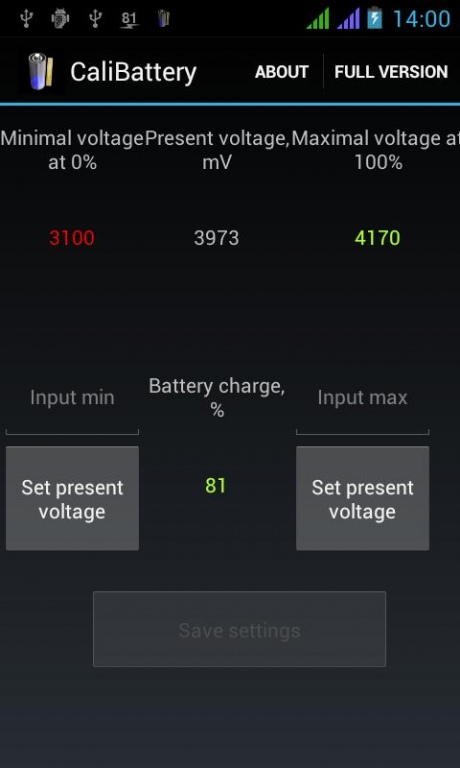
Battery info app with the manual voltage calibration.
It is actual for the device with a problem built-in battery info driver, showing wrong charge level. If your system indicator shows the battery charge OK - you do not need this app, no need to make negative review.
This utility can:
* get system's present voltage info of the battery (if the system returns it, it must be 4-digit value in milliVolts, usually 3400...4200, some device cannot do it)
* save the Max battery voltage you enter manually (when it's fully charged for sure)
* save the Min battery voltage you enter manually (when battery is just alive, discharged, say - just after switching on)
* calculate the battery charge % accoring to these voltage levels and show it
* notify, if battery (calculated) is getting low, and when is almost discharged (and must be pugged in for power source as soon as possible)
* save every hour battery charge statistics and show the graph chart
* optional auto-saving the min and max voltage, if it's smaller or exeeds the current voltage
* controlling the battery temperature
* shows average battery charge level, for several minutes (not moment)
* send data by email periodically: for remote controlling temperature. Calibration is possible - battery is several (3-4 degrees) hotter compared with room ambient temperature when Android is idle, and extra 3-4 degrees hotter when Android is powered up, charging. So some number can be deducted as the calibration value before sending.
NOTE: SMTP email server is stored encrypted.
* discharge speed (% per hour) calculation and the text alert, if exceeds the limit (option).
If charging from a power adapter - the value is negative.
* Experimental new function (paid option) - battery quality analysis (the possibility to bear the voltage drop at high load): switch the option on in the SETTINGS menu - the saving of charge and discharge stat (if no charger plugged in) will start. Use device several hours or days. STATISTICS menu can show the charts and analysis result, if battery quality evaluation is > 60% it's good, else the battery looks loosing its capacity.
* shows the rest life time evaluation as dd:hh:mm days:hours:minutes in the notification area, if the battery analysis option is activated (paid option)
NOTE: only Max and Min levels are correct, the linear calculated % values may differ from system's or other app's battery info, it's not a bug.
--------------------
Alarm minimal charge level is 40%, it is 5% after the registration (in-app billing payment by Google Wallet).
So, step-by-step:
1) Charge the device battery fully for sure (3-5 hours)
2) Start the application and make sure that the Present voltage is 4-digit value
3) Set the Max voltage by "Set present voltage" button under it
4) Set the Min voltage around 3200 mV or leave the default
5) Save the settings
6) Use the device until it switched off
7) Start charging and switch the device on and set now the Min voltage to the Present one
8) Save setting and try using your device checking the charge level.
About CaliBattery
The company that develops CaliBattery is Peacemakerv. The latest version released by its developer is 5.02.
To install CaliBattery on your Android device, just click the green Continue To App button above to start the installation process. The app is listed on our website since 2018-06-27 and was downloaded 0 times. We have already checked if the download link is safe, however for your own protection we recommend that you scan the downloaded app with your antivirus. Your antivirus may detect the CaliBattery as malware as malware if the download link to peacemaker.calibattery is broken.
How to install CaliBattery on your Android device:
- Click on the Continue To App button on our website. This will redirect you to Google Play.
- Once the CaliBattery is shown in the Google Play listing of your Android device, you can start its download and installation. Tap on the Install button located below the search bar and to the right of the app icon.
- A pop-up window with the permissions required by CaliBattery will be shown. Click on Accept to continue the process.
- CaliBattery will be downloaded onto your device, displaying a progress. Once the download completes, the installation will start and you'll get a notification after the installation is finished.
Program Details
System requirements
Download information
Pricing
Version History
version 5.02
posted on 2018-06-27
Notification icon fix on some devices
version 4.21
posted on 2017-12-01
Added a crash report tracker and sending to email
version 3.71
posted on 2016-12-25
v.3.71:,* added: the rest life time evaluation as dd:hh:mm days:hours:minutes in the notification area, if the battery analysis option is activated,v.3.61:,* RECOMMENDED UPDATE: bug fix of prev version in the existing in-app check - update and tap FULL VERSION once,* fixed: CPU usage statistics
version 1.3
posted on 2013-04-19
Several fixes and updates
Disclaimer
External Download
We do not host CaliBattery on our servers. We did not scan it for viruses, adware, spyware or other type of malware. This app is hosted by Galad and passed their terms and conditions to be listed there. We recommend caution when installing it.
The APK Download link for CaliBattery is provided to you by apps112.com without any warranties, representations or guarantees of any kind, so access it at your own risk.
If you have questions regarding this particular app contact the publisher directly. For questions about the functionalities of apps112.com contact us.
